
Register the company’s company cars here so that you can assign them to your employees and allocate car expenses to them. When the Mobility Pack platform is initialized, there are no vehicles. When vehicles are registered, an overview of the list will be displayed here.
Click on the icon to access the list of vehicles.

On the left, a list of your vehicles:
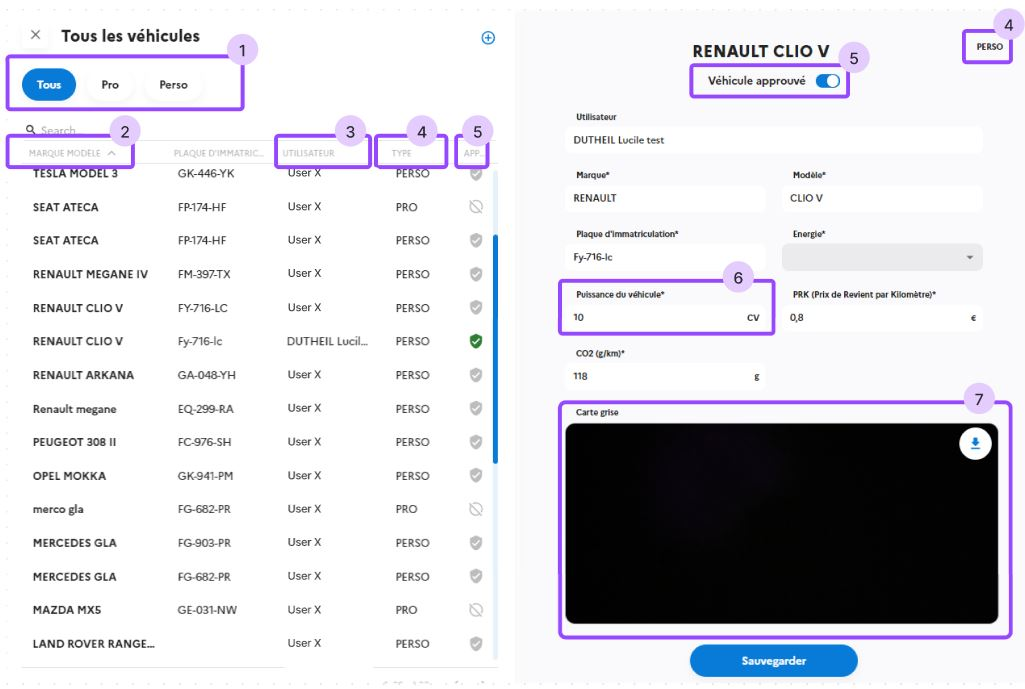
1: You can choose to filter the display by vehicle type (business, personal).
2-3-4: Listing display with essential information.
On the right-hand side, enter the information required to register a vehicle. This form can be modified.
5: Personal vehicles are entered using the mobile application. The information is declarative and is used as the basis for reimbursing IK (Indemnité Kilométrique). To facilitate these reimbursements and avoid having to check the vehicle every time, the vehicle can be “approved”, which will be indicated by a green pictogram. But be careful! If the user changes any information, approval will be suspended until a new check is carried out.
6: Fiscal power of the vehicle.
7: Add a photo of your vehicle registration document.
Don’t forget to REGISTER.
You can delete a vehicle if it has never been used (error in creation, duplicate, etc.), i.e. without any expenses attached.